> For the complete documentation index, see [llms.txt](https://docs.glassnode.com/llms.txt). Markdown versions of documentation pages are available by appending `.md` to page URLs; this page is available as [Markdown](https://docs.glassnode.com/further-information/metric-guides/global-metrics/global-metrics-methodology.md).
# Global Metrics Methodology
Global Metrics aggregate on-chain and market data across baskets of assets into continuous, rebalanced indices, extending the index methodology used for price to metrics like realized cap, open intere
## Indicator Overview
Most on-chain and market metrics are computed one asset at a time. Global Metrics aggregate them across a basket of assets, so the crypto ecosystem can be tracked as a whole rather than coin-by-coin. A basket can be a market-cap tier (Large, Mid, Small Cap), a top-N selection by any ranking metric, or all eligible assets.
The challenge with any basket-level metric is **continuity**. Because the basket is rebalanced periodically, its membership changes over time: a coin grows past a market-cap threshold and moves to another tier, a new asset is listed, an illiquid asset is dropped. Each membership change shifts the aggregate even when no individual asset's value moved. These jumps are artifacts of rebalancing, not real market movements.
Global Metrics solve this with the same approach traditional financial indices (S\&P 500, CMC20) use for price: a **scaling factor** applied at each rebalancing boundary, so the index carries through continuously when the basket changes. This methodology is extended here beyond price to on-chain and market metrics.
Each metric is published in two forms:
* **Raw aggregate** — the true aggregated value in original units (e.g. USD). Discontinuous at rebalancing dates. Use for absolute sizing and point-in-time snapshots.
* **Index** — scaling-factor-adjusted and normalized to a base of 100. Continuous and comparable across baskets. Use for trend analysis.
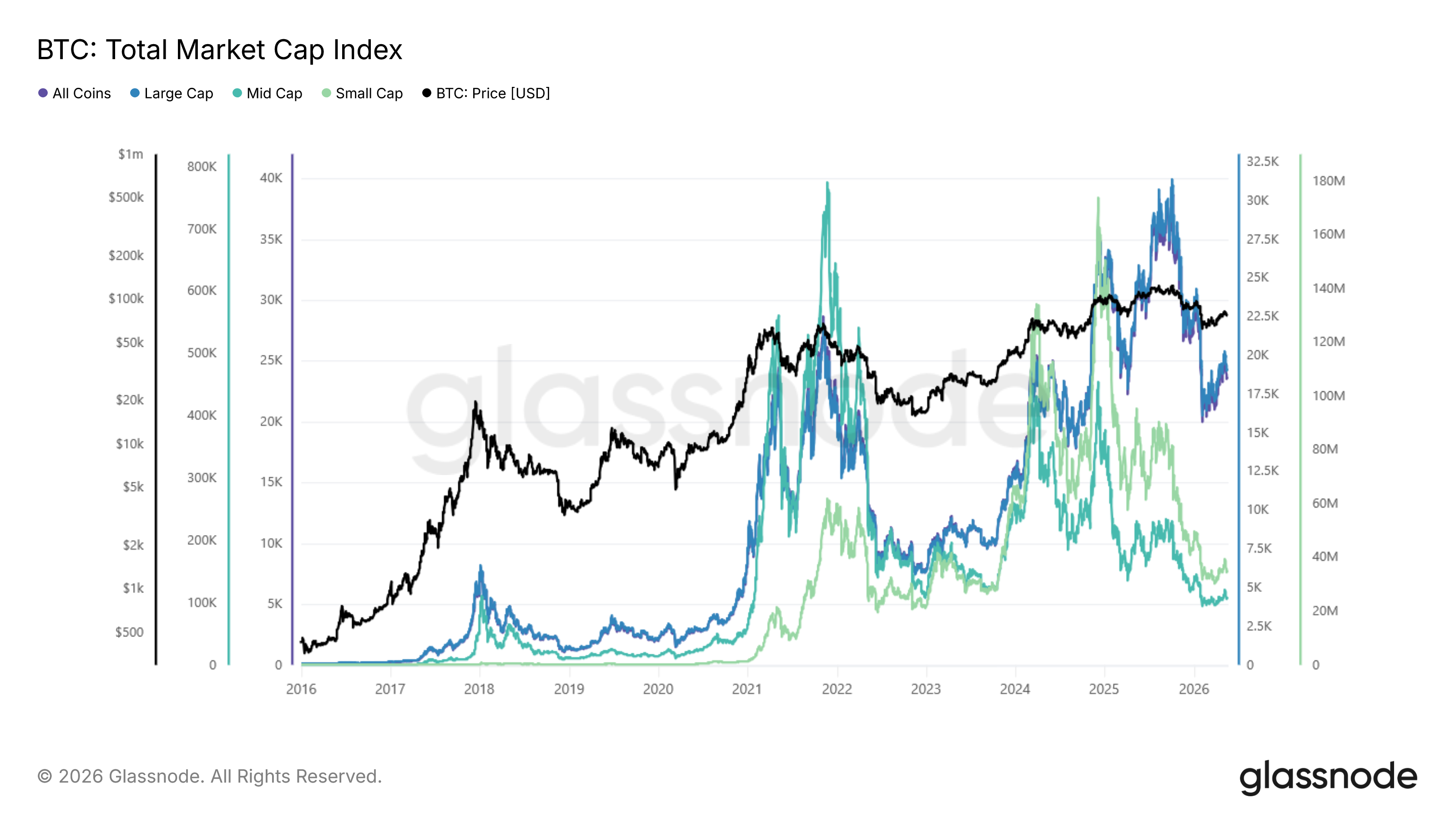
* [View Total Market Cap (Index) in Glassnode Studio](https://studio.glassnode.com/charts/global.MarketCapSumWeeklyEqualIndex)
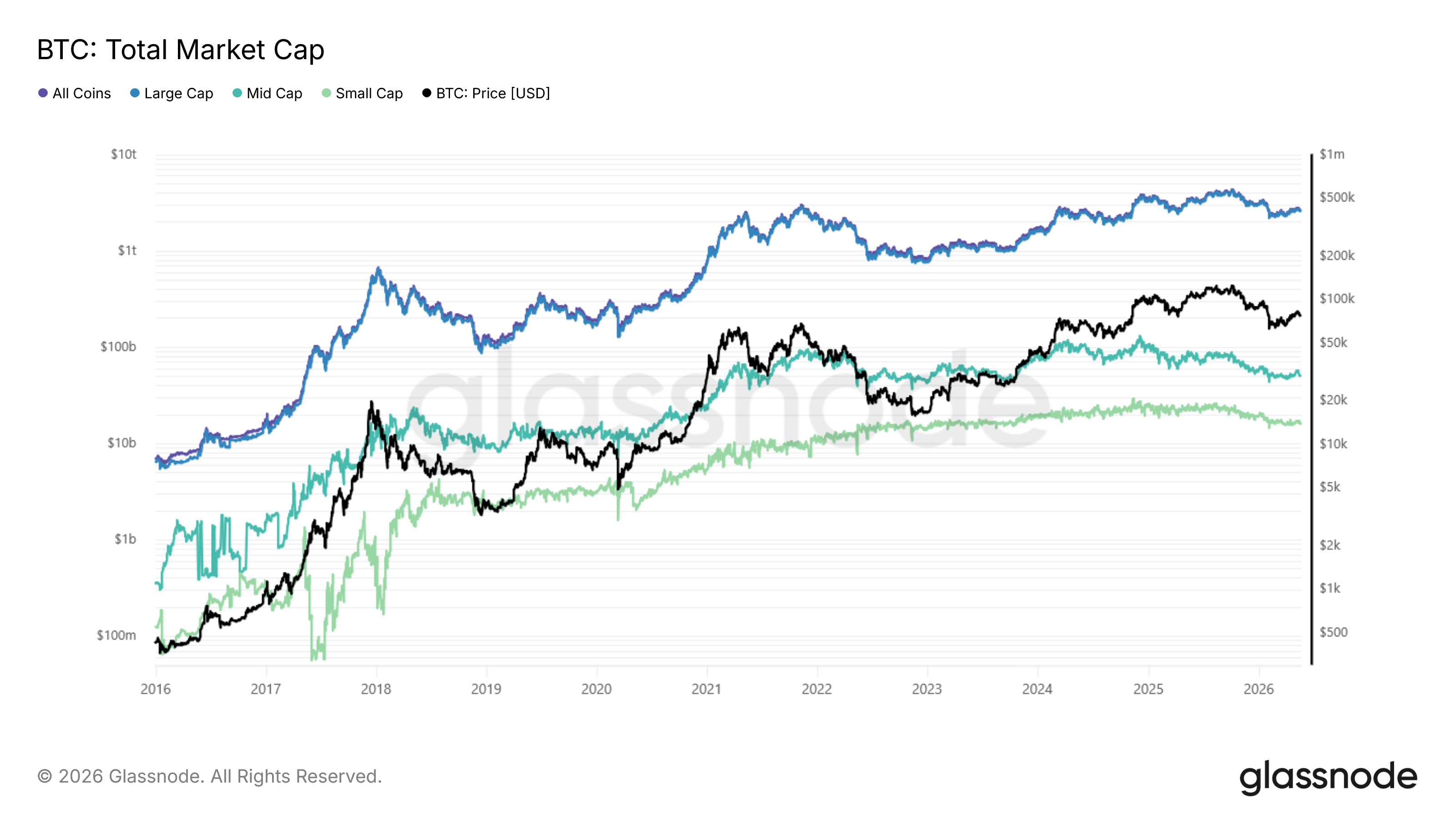
* [View Total Market Cap (Raw) in Glassnode Studio](https://studio.glassnode.com/charts/global.MarketCapSumWeeklyEqualRaw)
* [View Global Metrics in Glassnode API Docs](https://docs.glassnode.com/)
## How is it measured?
A Global Metric is computed in four stages: basket selection, rebalancing, aggregation, and continuity scaling.
### Basket Selection
At each rebalancing date, assets are selected into a basket by one of three methods:
* **THRESHOLD** — assets whose ranking value falls within a range (e.g. Large Cap: market cap ≥ $1B).
* **TOP\_N** — the top N assets by a ranking metric (e.g. top 50 by open interest).
* **ALL** — every eligible asset.
The default baskets are market-cap tiers: All Coins (no filter), Large Cap (≥ $1B), Mid Cap ($100M–$1B) and Small Cap (< $100M). Before selection, assets must pass an eligibility filter: a minimum rolling-average spot volume, and a tag filter that excludes staking and tokenized assets (which would double-count against their underlying). Once selected, basket membership is frozen until the next rebalancing date.
### Aggregation
Within a period, values are aggregated across the basket. The default is a **sum**:
$$
\textrm{aggregate}*t = \sum*{i,\in,\textrm{basket}} \textrm{value}\_{i,t}
$$
For ratio metrics such as SOPR, where summing is not meaningful, a **median** is used instead:
$$
\textrm{aggregate}*t = \textrm{median}\left(,{,\textrm{value}*{i,t} : i \in \textrm{basket},},\right)
$$
### Continuity Scaling
The raw aggregate is discontinuous at each rebalancing boundary. To produce the continuous index, a scaling factor is computed at every boundary as the ratio between the previous period's last index value and the current period's first raw value:
$$
\textrm{scaling factor} = \frac{\textrm{previous period last index value}}{\textrm{current period first raw value}}
$$
Each day in the new period is then scaled by this factor:
$$
\textrm{index value}\_t = \textrm{raw value}\_t \cdot \textrm{scaling factor}
$$
If the new basket has a higher raw aggregate than the old one (a large coin entered), the factor is below 1 and pulls values down to meet the previous period's last value; if the new basket is lower (a coin exited), the factor is above 1 and pushes them up. Either way the series joins up smoothly, and the index moves only when the underlying metric genuinely changes, never because the basket changed. Scaling factors compound across periods, so continuity is carried through the entire history.
### Normalization
Finally, the continuous series is normalized so the value on the base date equals 100:
$$
\textrm{index value}\_\textrm{base date} = 100
$$
This puts every basket on the same footing. An index value of 250 means the metric has grown 150% since the base date, so growth rates are directly comparable across tiers.
## User Guide
The two output forms answer different questions, and the difference is clearest on the smallest, highest-turnover tier.
In the **raw aggregate**, the Small Cap basket shows large discontinuities at rebalancing dates and cannot capture small-cap performance: every time a small cap performs well it grows past the threshold and leaves the basket, taking its gains with it ("winners leave"). The **index** neutralizes this effect, so a genuine small-cap rally becomes visible as a continuous move.
### Indicator Signals
* **Use the index for trend analysis.** It is continuous and base-100 normalized, so growth rates are directly comparable across baskets and over time.
* **Use the raw aggregate for absolute levels.** It preserves original units and is correct for point-in-time sizing, but it should not be read for trend because of rebalancing discontinuities.
* **Compare baskets on the index.** If the Small Cap index outperforms Large Cap, that suggests the market is broadening; if Large Cap outperforms, a flight to quality; if all tiers move together, a broad rally or selloff.
### Recommended Settings
* **Scale**: log for valuation metrics (market cap, realized cap, open interest); linear for ratio metrics (SOPR).
* **Output**: index for trend analysis, raw aggregate for absolute values.
## Available Metrics
Four metrics are available, each computed for all four market-cap baskets, with weekly rebalancing and equal weighting.
| Metric | Aggregation | Glassnode Studio |
| ------------------- | ----------- | --------------------------------------------------------------------------------------------------------------------------------------------------------------------- |
| Total Market Cap | Sum | [Raw](https://studio.glassnode.com/charts/global.MarketCapSumWeeklyEqualRaw) · [Index](https://studio.glassnode.com/charts/global.MarketCapSumWeeklyEqualIndex) |
| Total Realized Cap | Sum | [Raw](https://studio.glassnode.com/charts/global.RealizedCapSumWeeklyEqualRaw) · [Index](https://studio.glassnode.com/charts/global.RealizedCapSumWeeklyEqualIndex) |
| Total Open Interest | Sum | [Raw](https://studio.glassnode.com/charts/global.OpenInterestSumWeeklyEqualRaw) · [Index](https://studio.glassnode.com/charts/global.OpenInterestSumWeeklyEqualIndex) |
| Median SOPR | Median | [Raw](https://studio.glassnode.com/charts/global.SoprMedianWeeklyEqualRaw) · [Index](https://studio.glassnode.com/charts/global.SoprMedianWeeklyEqualIndex) |
## About
### Further Resources
* [Market Capitalization](/further-information/metric-guides/market-capitalization.md)
* [Realized Capitalization](/further-information/metric-guides/realized-capitalization.md)
* [SOPR (Spent Output Profit Ratio)](/further-information/metric-guides/sopr/sopr-spent-output-profit-ratio.md)